質問 67
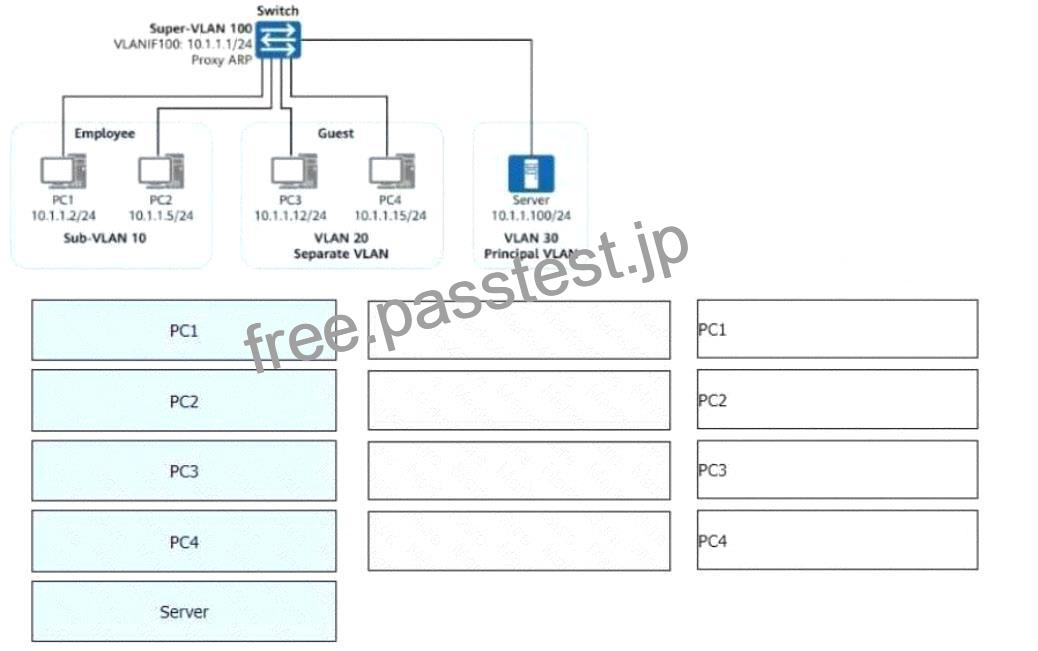
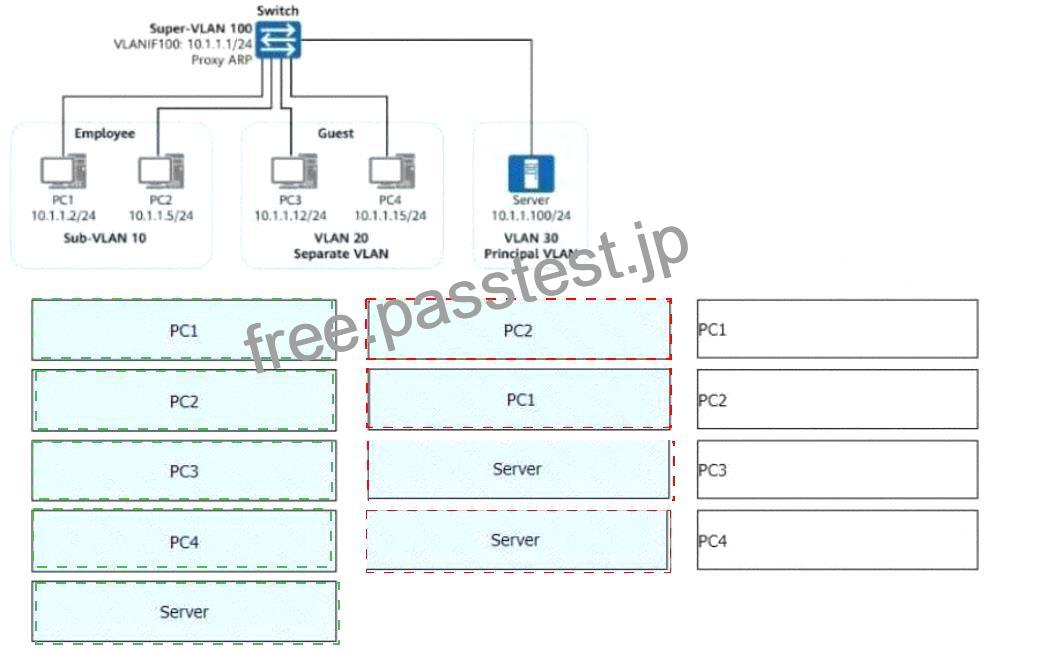
Both VLAN aggregation and MUX VLAN are deployed on the enterprise network shown in the figure.
* All switch interfaces connected to terminals are access interfaces.
* Given this, match PC1 to PC4 with the hosts or servers they can access on the network.
(Note: A host cannot be matched with itself. For example, PC1 cannot match PC1. Tokens can be reused.)
Explanation:

Comprehensive and Detailed In-Depth Explanation:
To determine the correct matches, we need to analyze VLAN aggregation and MUX VLAN behavior in the given topology.
1. Understanding VLAN Aggregation and MUX VLAN Roles
* VLAN Aggregation:
* Sub-VLANs (e.g., VLAN 10) are part of a Super-VLAN (e.g., VLAN 100) and share a common gateway.
* Hosts in the same Sub-VLAN can communicate directly.
* MUX VLAN (Multiple User Group VLAN):
* Principal VLAN (VLAN 30): Includes servers, accessible by all VLAN types.
* Separate VLAN (VLAN 20): Cannot communicate with other Separate VLAN hosts, but can communicate with the Principal VLAN (Server).
* Group VLAN (VLAN 10 – Sub-VLANs): Hosts within the same Group VLAN can communicate, and they can also access the Principal VLAN (Server).
2. Analyzing the Connectivity
* PC1 (Sub-VLAN 10 – Employee VLAN)
* Can communicate with PC2 (same Sub-VLAN).
* Can communicate with the Server (VLAN 30 – Principal VLAN).
* PC2 (Sub-VLAN 10 – Employee VLAN)
* Can communicate with PC1 (same Sub-VLAN).
* Can communicate with the Server (VLAN 30 – Principal VLAN).
* PC3 (VLAN 20 – Separate VLAN – Guest VLAN)
* Cannot communicate with other PCs in Employee VLAN (PC1, PC2) or Guest VLAN (PC4).
* Can communicate with the Server (VLAN 30 – Principal VLAN).
* PC4 (VLAN 20 – Separate VLAN – Guest VLAN)
* Cannot communicate with other PCs in Employee VLAN (PC1, PC2) or Guest VLAN (PC3).
* Can communicate with the Server (VLAN 30 – Principal VLAN).
* Server (VLAN 30 – Principal VLAN)
* Can communicate with all PCs (PC1, PC2, PC3, PC4) because it belongs to the Principal VLAN, which serves all VLANs.