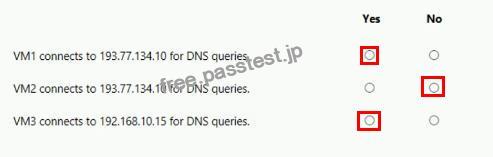
Reference:
https://docs.microsoft.com/en-us/azure/virtual-network/virtual-networks-faq#name-resolution-dns
新問題 106
You have an Azure Active Directory (Azure AD) tenant named contoso.com.
You have a CSV file that contains the names and email addresses of 500 external users.
You need to create a guest user account in contoso.com for each of the 500 external users.
Solution: You create a Power Shell script that runs the New-MgUser cmdlet for each user.
Does this meet the goal?
The New-MgUser cmdlet is part of the Microsoft Graph PowerShell SDK, which is a module that allows you to interact with the Microsoft Graph API. The Microsoft Graph API is a service that provides access to data and insights across Microsoft 365, such as users, groups, mail, calendar, contacts, files, and more1.
The New-MgUser cmdlet can be used to create new users in your Azure AD tenant, but it has some limitations and requirements. For example, you need to have the Global Administrator or User Administrator role in your tenant, you need to authenticate with the Microsoft Graph API using a certificate or a client secret, and you need to specify the required parameters for the new user, such as userPrincipalName, accountEnabled, displayName, mailNickname, and passwordProfile2.
However, the New-MgUser cmdlet does not support creating guest user accounts in your Azure AD tenant. Guest user accounts are accounts that belong to external users from other organizations or domains. Guest user accounts have limited access and permissions in your tenant, and they are typically used for collaboration or sharing purposes3.
To create guest user accounts in your Azure AD tenant, you need to use a different cmdlet: New-AzureADMSInvitation. This cmdlet is part of the Azure AD PowerShell module, which is a module that allows you to manage your Azure AD resources and objects. The New-AzureADMSInvitation cmdlet can be used to create and send an invitation email to an external user, which contains a link to join your Azure AD tenant as a guest user. You can also specify some optional parameters for the invitation, such as the invited user display name, message info, redirect URL, or send invitation message.
Therefore, to meet the goal of creating guest user accounts for 500 external users from a CSV file, you need to use a PowerShell script that runs the New-AzureADMSInvitation cmdlet for each user, not the New-MgUser cmdlet.
新問題 107
You have an on premises data center and an Azure subscription. The data center contains two VPN devices. The subscription contains an Azure virtual network named VNet1. VNet1 contains a gateway subnet.
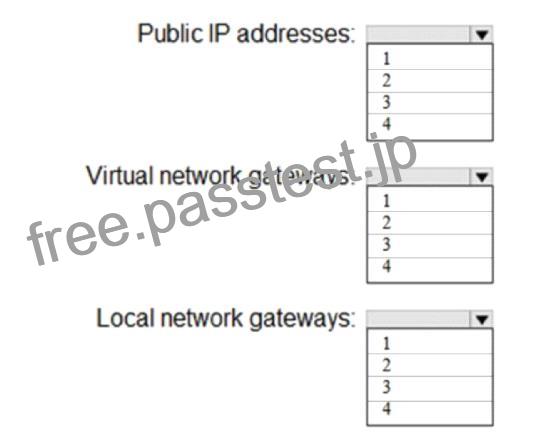
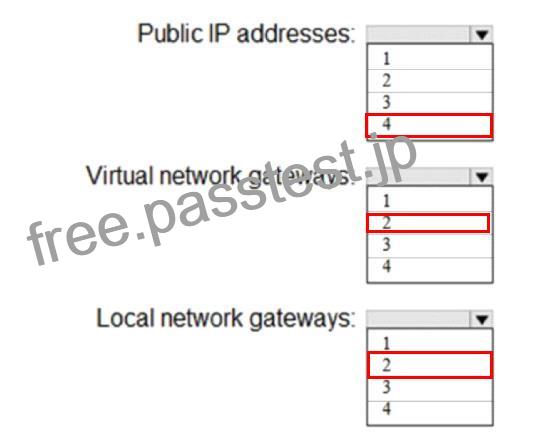
You need to create a site-to-site VPN. The solution must ensure that if a single instance of an Azure VPN gateway fails, or a single on-premises VPN device fails, the failure will not cause an interruption that is longer than two minutes.
What is the minimum number of public IP addresses, virtual network gateways, and local network gateways required in Azure? To answer, select the appropriate options in the answer area.
NOTE: Each correct selection is worth one point.
Reference:
https://docs.microsoft.com/en-us/azure/vpn-gateway/vpn-gateway-highlyavailable
新問題 109
Hotspot Question
You have an Azure subscription named Subscription1. Subscription1 contains a virtual machine named VM1.
You install and configure a web server and a DNS server on VM1.
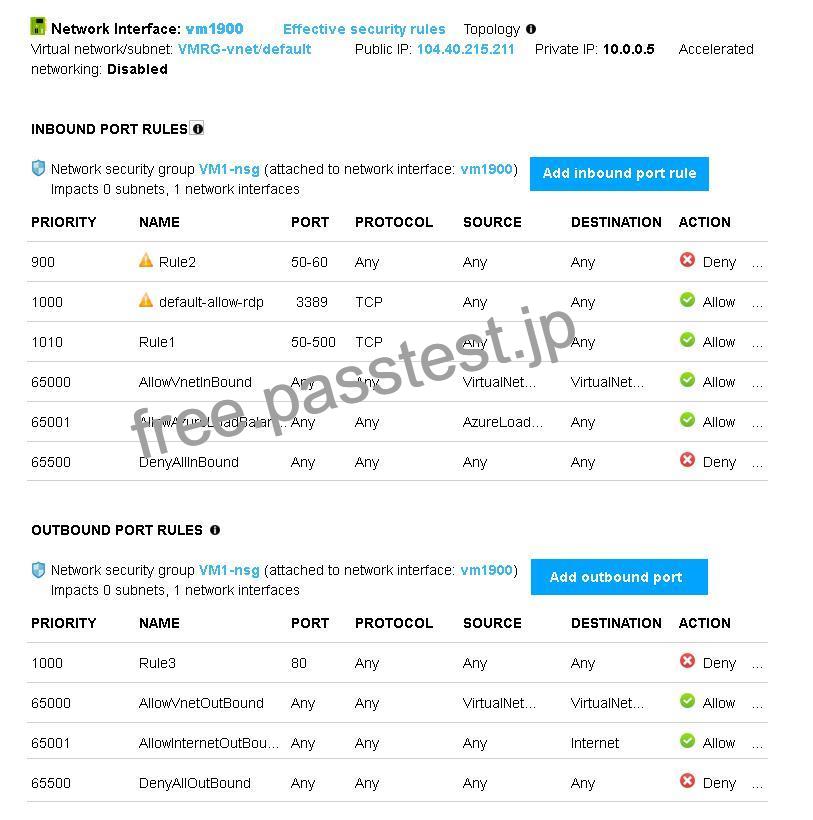
VM1 has the effective network security rules shown in the following exhibit.
Use the drop-down menus to select the answer choice that completes each statement based on the information presented in the graphic.
NOTE: Each correct selection is worth one point.
Explanation:
Box 1:
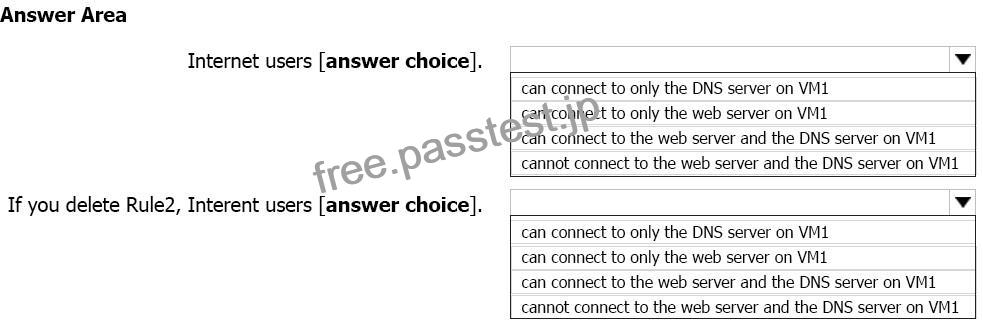
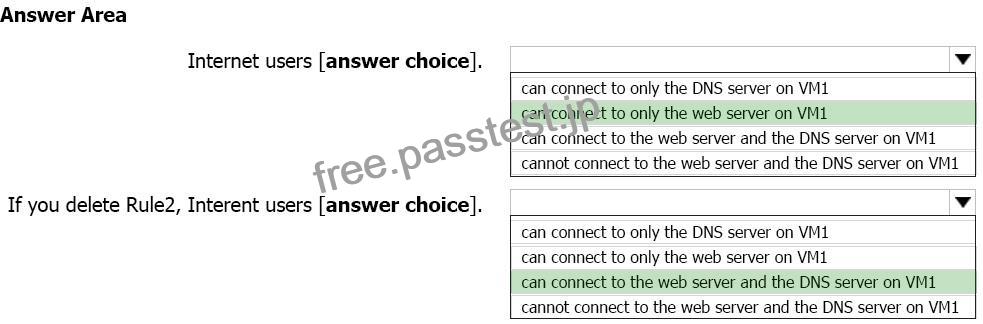
Rule2 blocks ports 50-60, which includes port 53, the DNS port. Internet users can reach the Web server, since it uses port 80.
Box 2:
If Rule2 is removed internet users can reach the DNS server as well.
Note: Rules are processed in priority order, with lower numbers processed before higher numbers, because lower numbers have higher priority. Once traffic matches a rule, processing stops. As a result, any rules that exist with lower priorities (higher numbers) that have the same attributes as rules with higher priorities are not processed.
References:
https://docs.microsoft.com/en-us/azure/virtual-network/security-overview
新問題 110
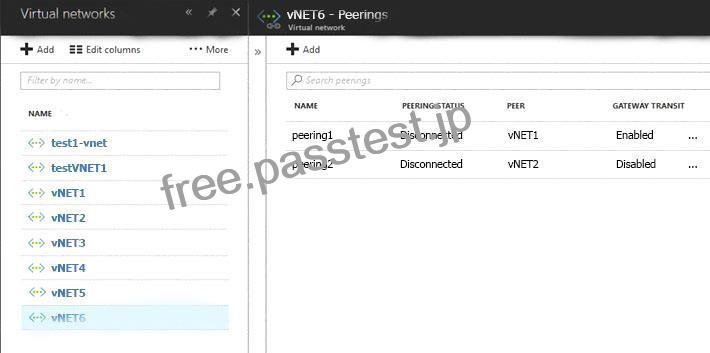
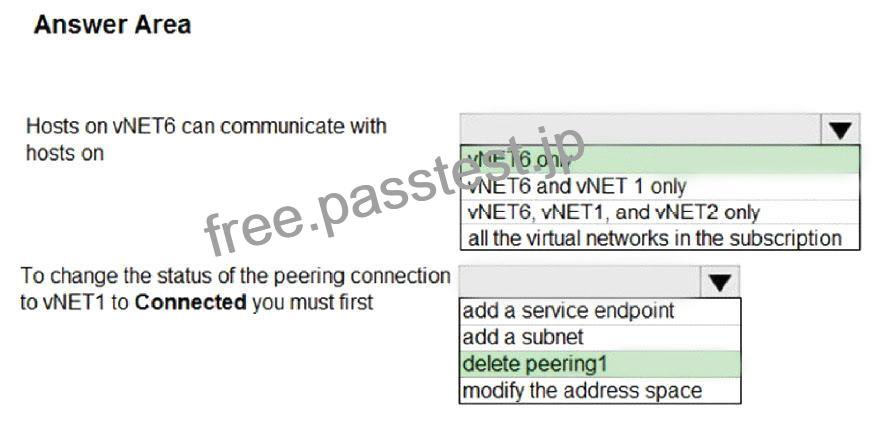
You have peering configured as shown in the following exhibit.
Use the drop-down menus to select the answer choice that completes each statement based on the information presented in the graphic.
NOTE: Each correct selection is worth one point.
Explanation
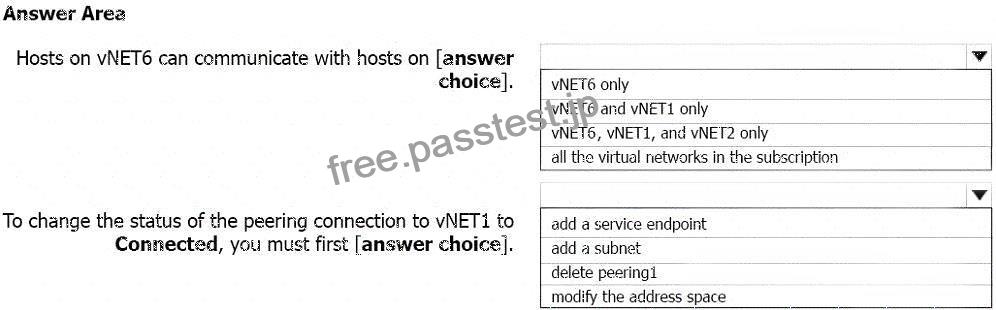
Box 1: vNET6 only
Peering status to both VNet1 and Vnet2 are disconnected.
Box 2: delete peering1
Peering to Vnet1 is Enabled but disconnected. We need to update or re-create the remote peering to get it back to Initiated state.
Reference:
https://blog.kloud.com.au/2018/10/19/address-space-maintenance-with-vnet-peering/
https://docs.microsoft.com/en-us/azure/virtual-network/virtual-network-manage-peering#requirements-andconstr
新問題 112
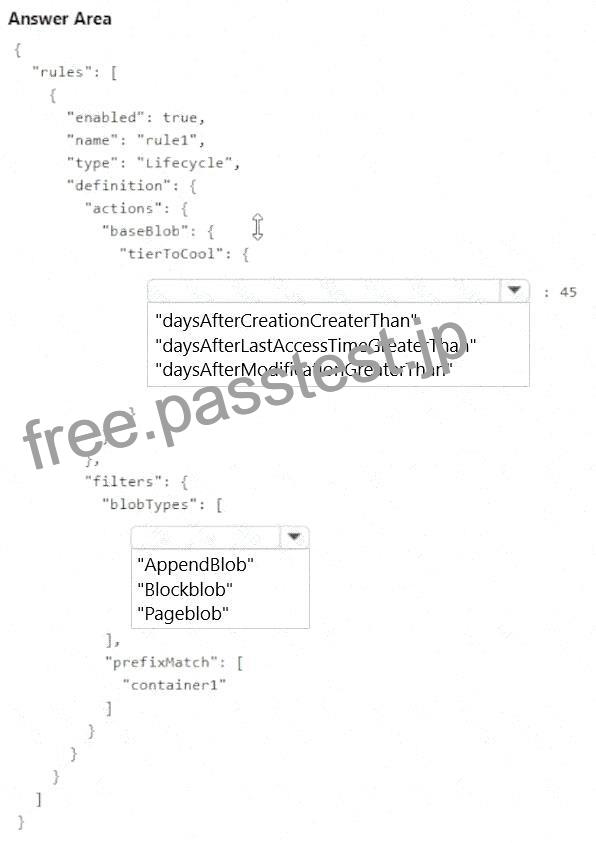
You have an Azure subscription that contains a storage account named storage1. The storage 1 account contains a container named containet1.
You create a blob lifecycle rule named rule1.
You need to configure rule1 to automatically move blobs that were NOT updated for 45 days Irom container!
to the Cool access tier.
How should you complete the rule? To answer, select Ihe appropriate options in the answer area.
NOTE: Each correct answer is worth one point.
Explanation:
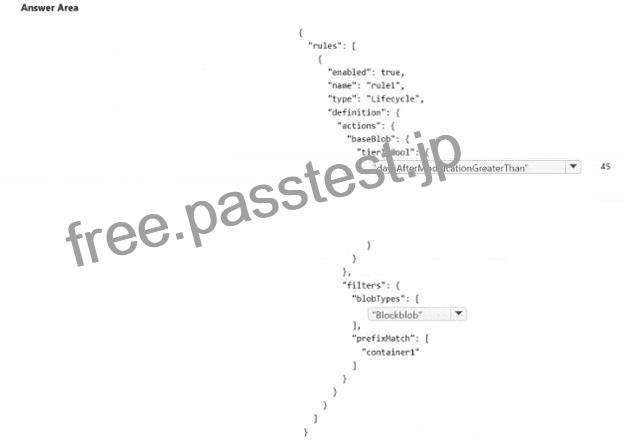
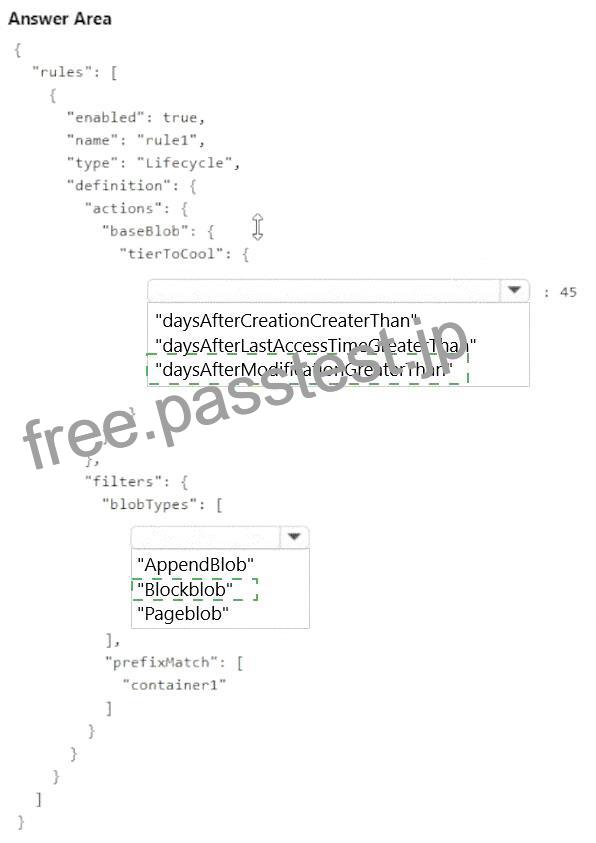
1. daysAfterModificationGreaterThan
2. Blockblob
https://learn.microsoft.com/en-us/azure/storage/blobs/lifecycle-management-overview#rule-actions daysAfterModificationGreaterThan
新問題 114
You have several Azure virtual machines on a virtual network named VNet1.
You configure an Azure Storage account as shown in the following exhibit.
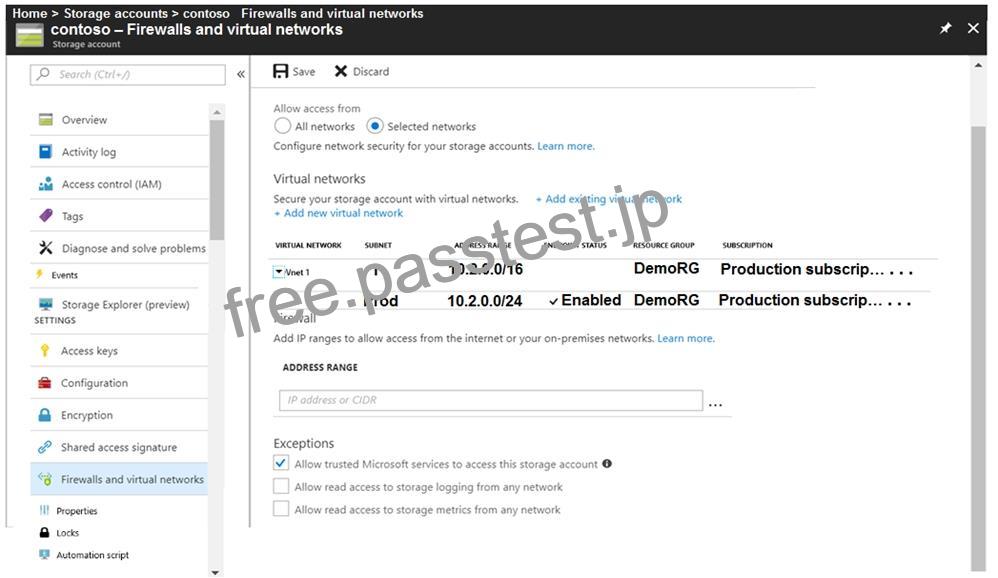
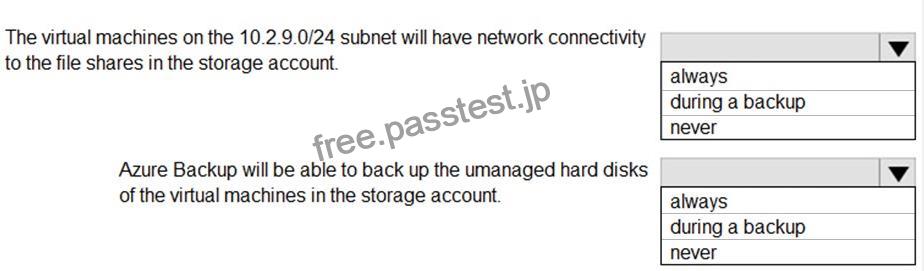
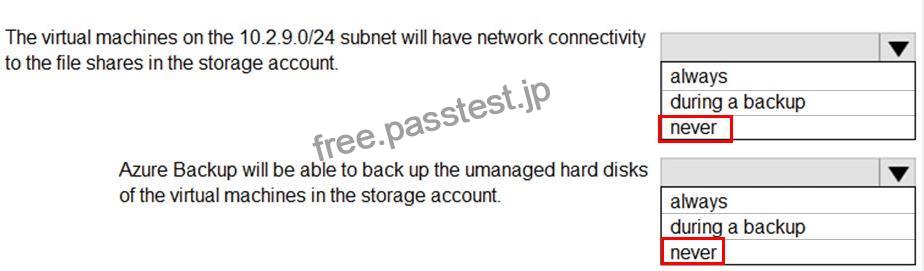
Use the drop-down menus to select the answer choice that completes each statement based on the information presented in the graphic.
NOTE: Each correct selection is worth one point.
Reference:
https://docs.microsoft.com/en-us/azure/storage/common/storage-private-endpoints
https://azure.microsoft.com/en-us/blog/azure-backup-now-supports-storage-accounts-secured-with-azurestorage-firewalls-and-virtual-networks/
新問題 116
You have an Azure subscription named Subscription1 that contains the following resource group:
* Name: RG1
* Region: West US
* Tag: “tag1”: “value1”
You assign an Azure policy named Policy1 to Subscription1 by using the following configurations:
* Exclusions: None
* Policy definition: Append tag and its default value
* Assignment name: Policy1
* Parameters:
– Tag name: Tag2
– Tag value: Value2
After Policy1 is assigned, you create a storage account that has the following configurations:
* Name: storage1
* Location: West US
* Resource group: RG1
* Tags: “tag3”: “value3”
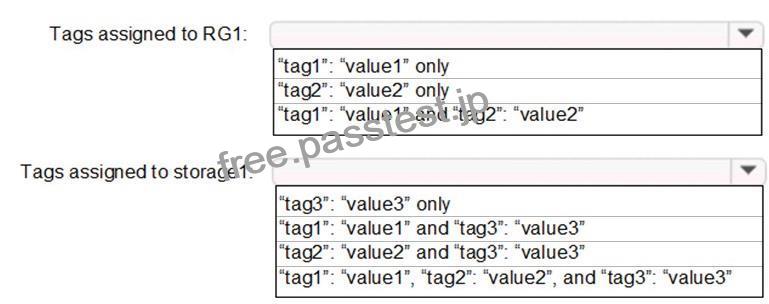
You need to identify which tags are assigned to each resource.
What should you identify? To answer, select the appropriate options in the answer area.
NOTE: Each correct selection is worth one point.
Explanation
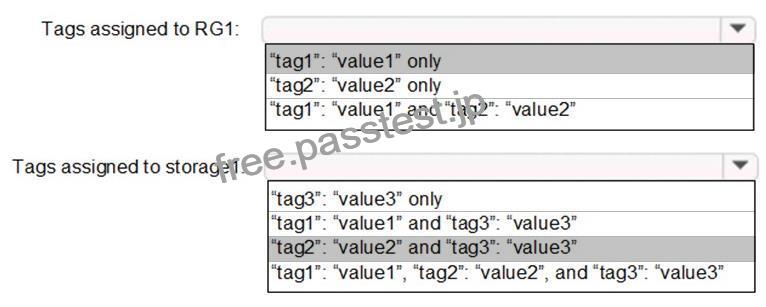
Box 1: “tag1”: “value1” only
Box 2: “tag2”: “value2” and “tag3”: “value3”
Tags applied to the resource group are not inherited by the resources in that resource group.
References:
https://docs.microsoft.com/en-us/azure/azure-resource-manager/resource-group-using-tags
Explanation
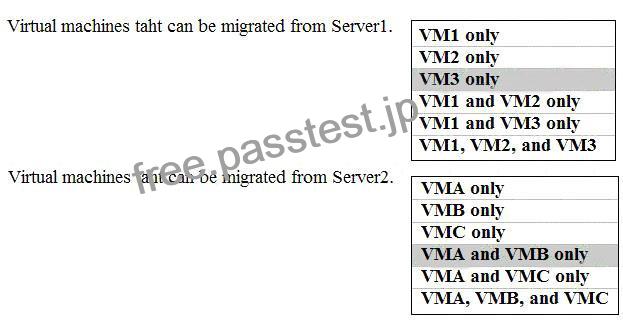
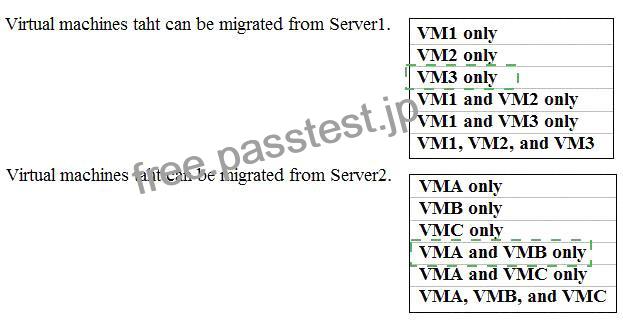
Not VM1 because it has BitLocker enabled.
Not VM2 because the OS disk is larger than 2TB.
Not VMC because the Data disk is larger than 4TB.
References:
https://docs.microsoft.com/en-us/azure/site-recovery/hyper-v-azure-support-matrix#azure-vm-requirements
新問題 118
You have an Azure subscription. The subscription includes a virtual network named VNet1. Currently, VNet1 does not contain any subnets.
You plan to create subnets on VNet1 and to use application security groups to restrict the traffic between the subnets. You need to create the application security groups and to assign them to the subnets.
Which four cmdlets should you run in sequence? To answer, move the appropriate cmdlets from the list of cmdlets to the answer area and arrange them in the correct order.
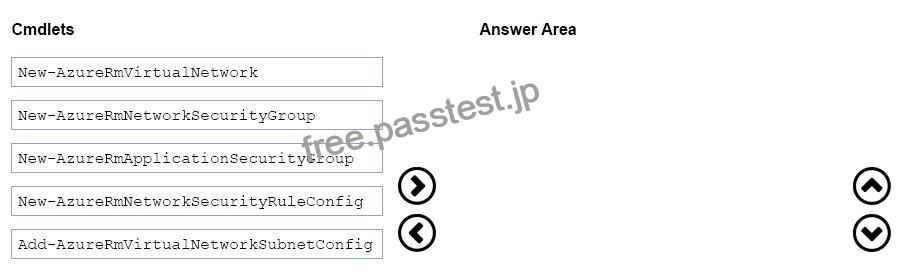
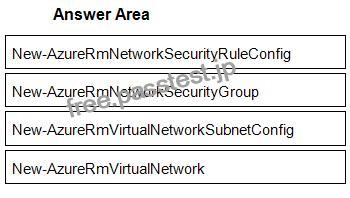
1 – New-AzureRmNetworkSecurityRuleConfig
2 – New-AzureRmNetworkSecurityGroup
3 – New-AzureRmVirtualNetworkSubnetConfig
4 – New-AzureRmVirtualNetwork
References: https://docs.microsoft.com/en-us/powershell/module/azurerm.network/new-azurermvirtualnetwork?view=azurermps-6.7.0
新問題 119
You have Azure virtual machines that run Windows Server 2019 and are configured as shown in the following table.

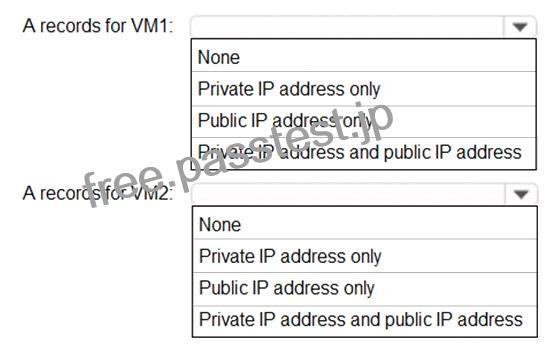
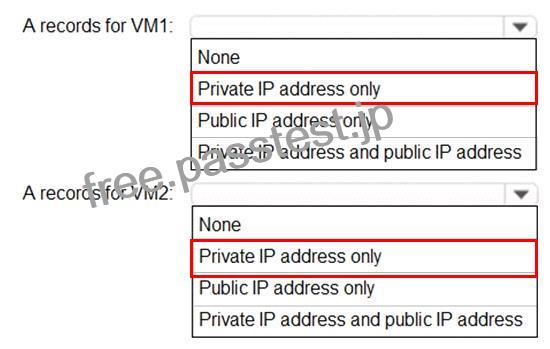
You create a private Azure DNS zone named adatum.com. You configure the adatum.com zone to allow auto registration from VNET1.
Which A records will be added to the adatum.com zone for each virtual machine? To answer, select the appropriate options in the answer area.
NOTE: Each correct selection is worth one point.
Reference:
https://docs.microsoft.com/en-us/azure/dns/private-dns-overview
https://docs.microsoft.com/en-us/azure/dns/private-dns-scenarios